 NextEdge
School bus tracking software that needs no extra hardware
Parents worry most about the bus. With NextEdge the driver opens the app, taps Start, and parents can see the last position of their child's bus.
What you can do
- Set up routes with the vehicle number, driver, helper and stops, and assign students to a route
- The driver opens the app, chooses the route and taps Start sharing. The phone sends its location every 20 seconds while the screen is open
- Parents open Where is the bus? to see how long ago the bus was seen, its speed and a map link, plus the driver's number
- Already have GPS trackers? They can send positions to NextEdge using a key and the vehicle number
- The office sees every route and the last position of each bus on one panel
- Ending the trip removes the bus from parents' screens, so nobody sees an old position
- A parent only sees the bus their own child rides, and a driver's login opens the transport screen and nothing else
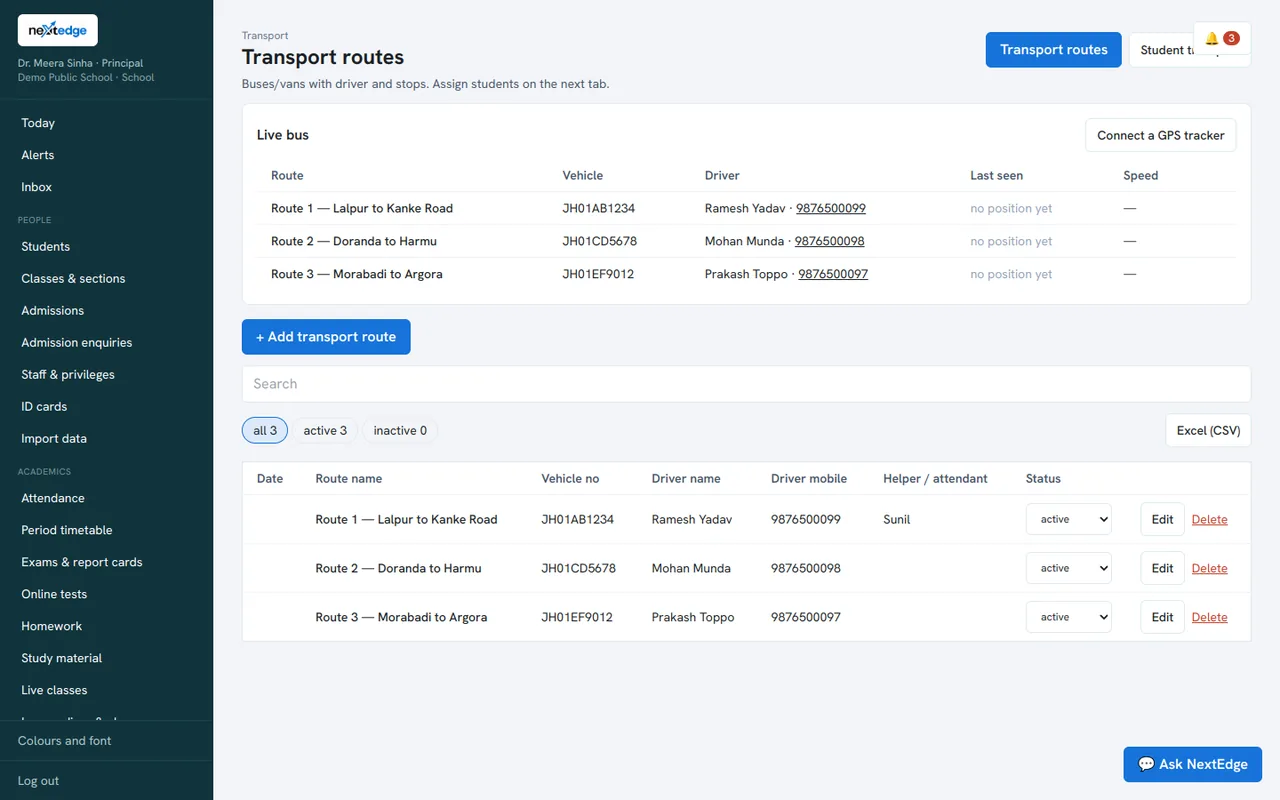
A real screen from the NextEdge admin panel, with demo data.
How it works
Add routes
Vehicle, driver, helper and stops.
Assign students
Each child is linked to a route and stop.
Driver starts
One tap in the app.
Parents follow
See the last position and a map link.
Who uses it
Bus drivers
One screen to start and end a trip.
Parents
Know where the bus is without calling the driver.
Transport in-charge
Watch all routes on one panel.
Common questions
Do we need to buy GPS devices?
No. A driver's phone is enough. If you already have GPS trackers, they can send positions too.
What do parents see if the phone loses signal?
The last known position and how long ago it was seen.
Can I use it on an iPhone?
Yes, through the web app in Safari. An iPhone can pause location sharing when the screen locks, so the driver should keep the screen on, or you can use a GPS tracker.
Does it show an arrival time?
Not yet. It shows the last position, the speed and a map link.
See it with your own data
Book a free demo, or try the live demo school now.