 NextEdge
School fee management software that gets fees in on time
Fees are where small mistakes cost real money. NextEdge keeps every student's plan, payments and balance in one place, so the office always knows who has paid and parents always know what they owe.
What you can do
- Create fee plans (monthly, quarterly or yearly) and assign one to a whole class or batch in a single step
- Record a payment and issue a numbered receipt. The parent is told straight away
- See a defaulters list, biggest balance first, and remind everyone with one tap by app, WhatsApp or SMS
- Apply a late fine to every student who is overdue
- Check collected and outstanding fees by class, and the daily collection, in the Fees reports
- Let parents see their child's balance in the app and pay through a Razorpay payment link (you connect your own Razorpay account)
- Give your accountant the Fees module only, nothing else
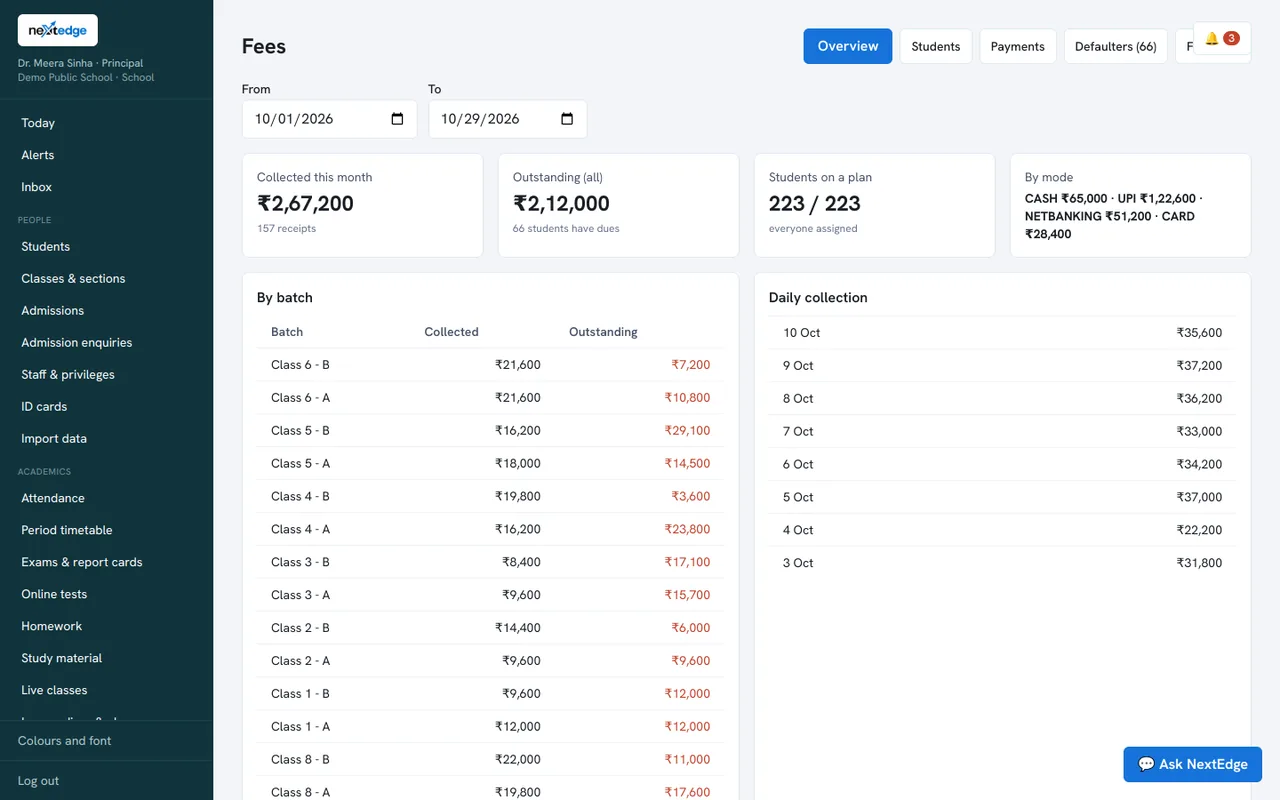
A real screen from the NextEdge admin panel, with demo data.
How it works
Create plans
Set the amount and how often it is charged.
Assign
Attach a plan to a class or a whole batch.
Collect
Record payments and hand out numbered receipts.
Follow up
Remind, fine and report.
Who uses it
Office and accountant
Record payments, print receipts, chase dues.
Principal or owner
Track collection and outstanding by class.
Parents
See the balance and pay online.
Common questions
Can parents pay school fees online?
Yes. A parent taps Pay now and gets a Razorpay payment link for the current balance. You need your own Razorpay account, and Razorpay's charges are separate.
Can we charge a late fine?
Yes. The office applies a late fine to the students who are overdue.
Do parents get fee reminders?
Yes, by app, WhatsApp or SMS depending on what you have connected. These use your own provider accounts, such as MSG91 or Meta WhatsApp.
Can the accountant see only fees?
Yes. The owner chooses which modules each staff member can open.
See it with your own data
Book a free demo, or try the live demo school now.